
Charge for less, while you sleep.
Smart home charging for UK drivers. Vorsprung Connect runs your charger around your tariff and the grid, with the car ready when you leave.
Works with Octopus Agile, Intelligent Octopus Go, Economy 7 and any cheap-rate tariff. Meets the UK smart charging rules.

Reading tonight's grid forecast
5
charging modes, from cheapest to cleanest
48
half-hour Agile prices a day, read for your area
~25
miles of range an hour from a 7 kW home charger
3
ways to start: the app, plug and play, or an RFID card
Plug in. We'll handle the rest.
A night with Vorsprung Connect, from the driveway to the morning. Your charger does the planning; you only plug in.
-
Plug in when you get home
Nothing starts yet. The app shows when charging will begin, and Charge now starts it straight away if you need to.
-

It waits for the right hours
Your charging mode decides when: outside peak hours by default, or the cheapest or cleanest hours before you leave.
-

It charges quietly
The schedule is stored on the charger itself, so it starts on time even if your internet drops.
-

Ready by morning
Every session goes into your history with the energy it used and how long it took.
Five ways to charge. One tap to switch.
Pick the mode that suits your tariff. For the cheapest or cleanest hours, tell the app how much energy you need and when you leave, and it plans around you.
-
Charges from 22:00 to 08:00 every day, away from the grid's busiest hours: 08:00 to 11:00 and 16:00 to 22:00 on weekdays. The default.
-
Picks the cheapest hours on your tariff before you need the car. On Octopus Agile it reads your area's half-hourly prices.
-
Picks the hours when the grid near you is cleanest, from the regional carbon forecast. Works on every tariff.
-
Balances price and carbon, for hours that are both cheap and clean.
-
You choose the hours for each day, in 30-minute steps. The app warns you if they fall in peak hours.


Your charger, in your pocket.
Everything your charger can do, from the first scan of its QR code to twelve months of history.
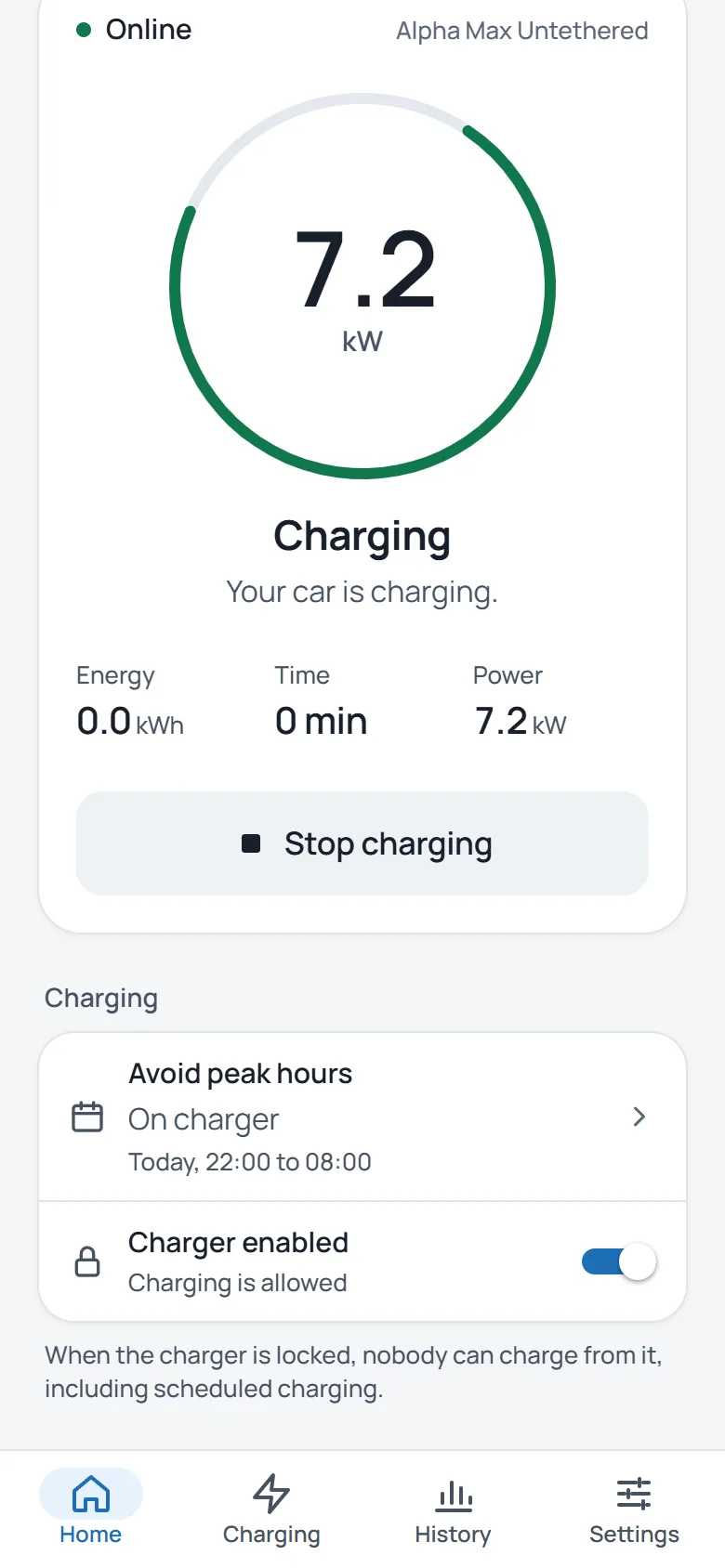
Live status
See whether the car is charging, waiting or offline, and when the next charge starts. Charge now and Stop are one tap.
Your tariff
Octopus Agile prices are read for you. On Economy 7, Intelligent Octopus Go or similar, enter your cheap hours once.
Charging history
Twelve months of charging: the energy each month and every session, with how long it took.
You decide who charges
Start charging from the app only, whenever a car plugs in, or with an RFID card or fob you've added.
Keeps going offline
If your internet drops, the charger keeps the charging times it already has and RFID cards still work. Stand next to it to reconnect Wi-Fi over Bluetooth.
Built for UK rules
Meets the Electric Vehicles (Smart Charge Points) Regulations 2021, including the randomised start you can turn off.

When is tonight's power cleanest?
The grid is cleanest when the wind is up and demand is down. Lowest carbon mode looks for hours like these. Enter your postcode to see when they fall tonight.
Forecast from the Carbon Intensity API by NESO, Great Britain's energy system operator. Only the first half of your postcode is sent, and we don't keep it.
Overnight
Reading tonight's cleanest four hours for central London…
Up and running in three steps.
Your installer adds your charger
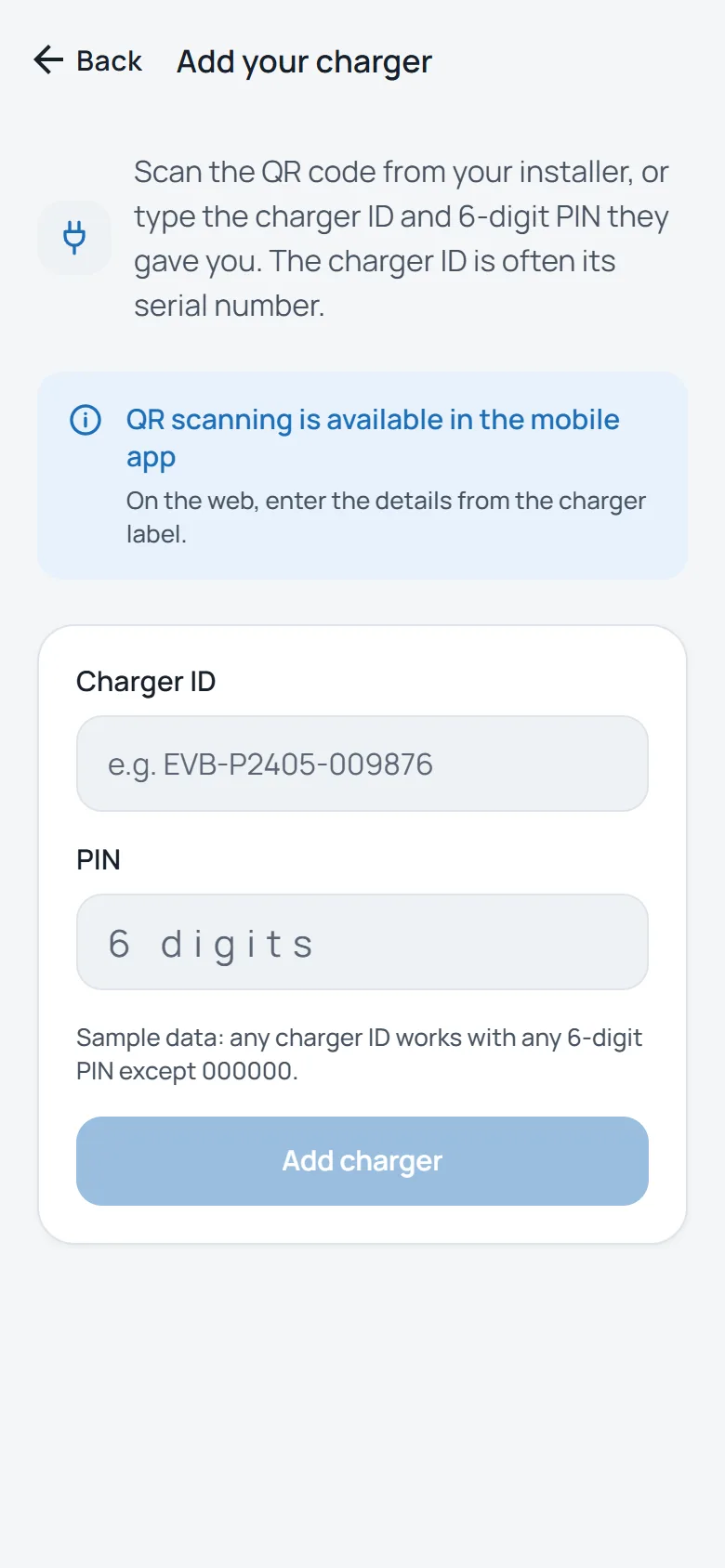
They give you its charger ID and a 6-digit PIN.
Download the app
For iPhone and Android. Sign in with email or Google, or with Apple on iPhone.
Scan your installer's QR code
Or type the charger ID and PIN. Keep the off-peak default or choose your own times.
Questions, answered.
The things drivers ask us most. Can't find yours? We're happy to help.
Something not right with your charger?
Tell us its ID and your email app opens a message to our support team, with the ID filled in.
The charger ID is in the app under Settings, and your installer gave it to you with the PIN. Or write to [email protected].
How do I get my charger into the app?
Your installer adds the charger to Vorsprung and gives you its charger ID and a 6-digit PIN. Download the app, create an account, then scan the QR code from your installer or type the ID and PIN. Setting up a new charger yourself? Choose Set up a charger in the app and stand next to it: the app connects it to your Wi-Fi over Bluetooth.
What times does it charge by default?
From 22:00 to 08:00, outside the busy hours on the grid. The first time you open the app you can keep those times or change them, and you can change them again whenever you like.
Why does charging start a few minutes late?
UK smart charging rules ask chargers to start at a random moment up to 10 minutes after the set time, so thousands of cars don't switch on at once. You can turn the randomised start off in Settings.
Do I need Octopus Energy?
No. On Octopus Agile the app reads your area's half-hourly prices. On Economy 7, Intelligent Octopus Go or any other cheap-rate tariff, enter your cheap hours. Lowest carbon works on every tariff.
What if I need the car sooner?
Tap Charge now and the charger starts straight away, whatever the schedule. Tap Stop to end the charge.
Can someone else use my charger?
Only if you let them. Choose whether charging starts from the app only, whenever a car plugs in, or with an RFID card you have added.
What if my internet goes down?
The charger keeps the charging times it already has, and RFID cards still work. The app shows when the charger is offline, and you can connect it to a new network over Bluetooth while standing next to it.
What happens when I move house?
The charger stays with the home. When you delete your account, the charger is unlinked and keeps its settings. The next owner links it with its charger ID and PIN, and sees only their own sessions.
What happens to my data?
We keep what the app needs to run your charger: your account, your charger and its charging history. We don't sell it or use it for advertising. The privacy policy has the detail.
How do I delete my account?
In the app, go to Settings and tap Delete account. Without the app, follow the steps on the delete your account page.